All staff members have access to the Incision Assist app (on your mobile or tablet) and Incision Assist Web (on your computer or laptop).
As a key user, you also have access to the backend: Incision Assist Manager (also on computer or laptop).
In the Incision Assist Manager, you can edit and publish protocols. However, while you’re working, you may prefer to use Assist Web to view the information.
You can also use Assist Web to see how things appear to your colleagues.
For both Incision Assist Manager and Incision Assist Web, go to:
? https://assist.incision.care/
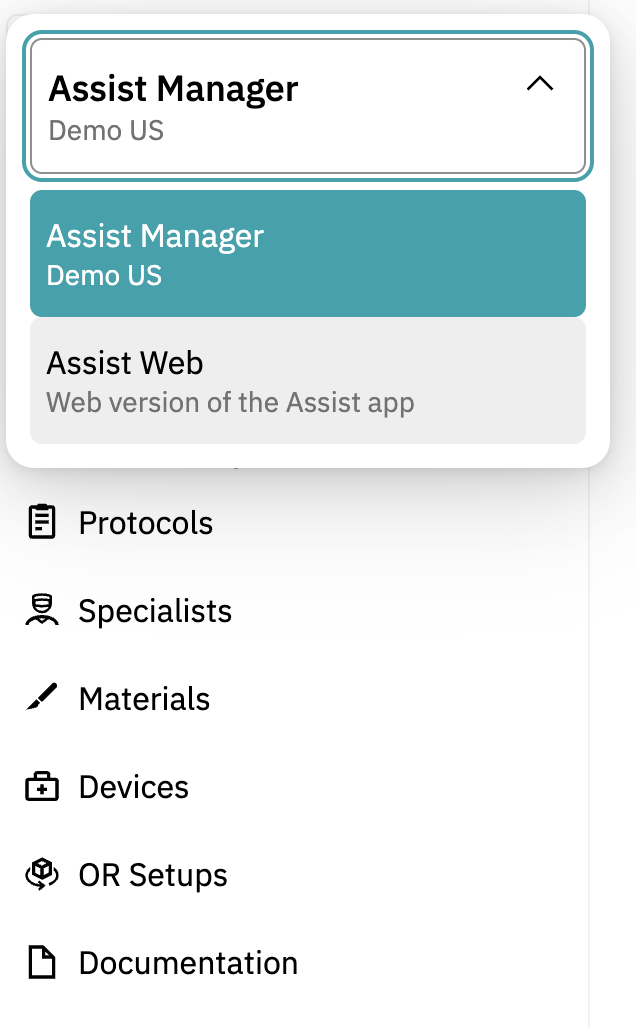
You can switch between Incision Assist Manager and Incision Assist Web using the button at the top of your screen. Click on ‘Assist Manager’ (or ‘Assist Web’ if you’re already in it), then click on the other. See the screenshot below for clarification!
Want to learn more? Check out our other guides on using the Incision Assist Manager!
Was this article helpful?
That’s Great!
Thank you for your feedback
Sorry! We couldn't be helpful
Thank you for your feedback
Feedback sent
We appreciate your effort and will try to fix the article